Estimating an Issue
How a Planning Poker room works: decks, the question card, the timer, reveal, estimation methods, the consensus label, and saving points to Jira
Updated
Every estimate in Agile Toolbox happens in a Planning Poker room that belongs to one Jira issue. The room is the same whether you open it for a single issue from the issue view, or expand an issue inside a refinement.
Opening a room
- From a refinement: open the refinement and expand the issue row.
- From the issue view: press the … actions menu on the issue and choose Start poker. This is the quickest way to estimate one issue without preparing a list.
The first person to open a room configures it and becomes its owner. Everyone who opens the same issue afterwards joins the room and appears in the Team list. See Roles and permissions.
Voting
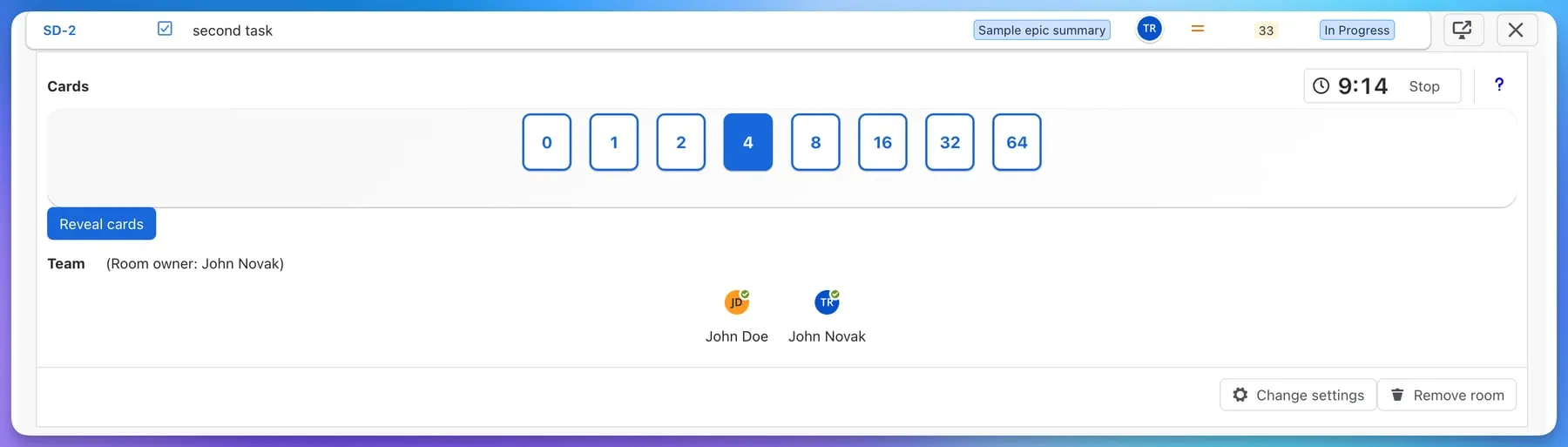
- The owner explains the issue. The full issue can be opened in a dialog from the room header without leaving the page.
- Everyone picks a card. Clicking the same card again unselects it, and you can change your card any time before the reveal.
- The Team list marks each person who has voted, without showing what they picked.
- Optionally, the owner starts the timer. Pick a preset or type a number of minutes; the timer turns amber during the last minute and shows Time’s up when it runs out. Voting stays open, so the owner still decides when to reveal.
- The owner presses Reveal cards.
The question card
If the room includes the ? card, anyone who needs more information can pick it. A “?” counts as an abstention: the room reports how many people abstained and calculates the estimate from the numeric cards only.
After the reveal
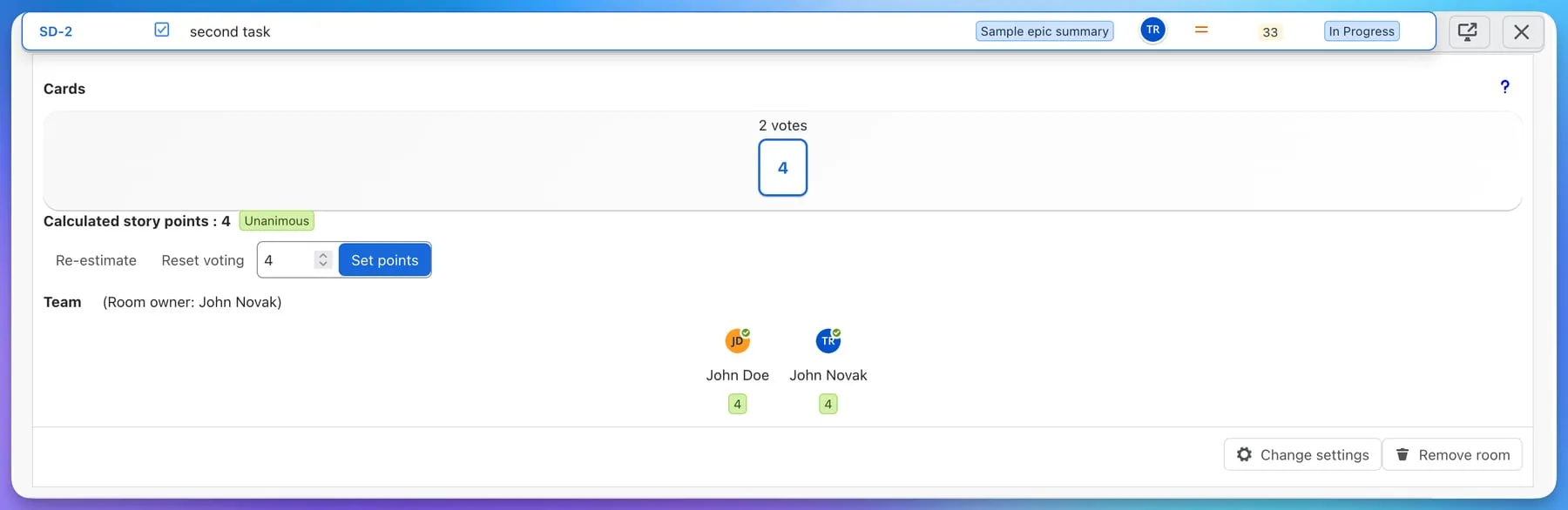
Every card that received votes is shown with its count, and each participant’s card appears under their avatar. Above them:
- Calculated story points is the room’s proposal, computed with the estimation method configured for the room:
- Most voted card: the card chosen most often.
- Average: the arithmetic mean, snapped to the nearest card in the deck.
- Median: the middle value, snapped to a card in the deck.
- Highest voted card: the largest card anyone picked. For T-shirt decks the methods work on the order of the sizes.
- A consensus label: Unanimous when everyone picked the same card, Close when the votes are neighbours in the deck, Split when they are further apart and the team should talk.
The owner can then:
- Edit the number and press Set points to write it to the Jira field configured for the room. A Jira flag confirms the save.
- Press Reset voting to clear all cards and vote again.
- Press Re-estimate later to open a new round without losing the room.
Decks
| Deck | Cards |
|---|---|
| Fibonacci | 0, 1, 2, 3, 5, 8, 16, 20, 40 |
| Powers of two | 0, 1, 2, 4, 8, 16, 32, 64 |
| T-shirt sizes | XXS, XS, S, M, L, XL, XXL |
| Custom | Any numeric values you type in |
Any deck can include the ? card. The deck, the estimation method and the target field are set per room; see Room configuration.
Tips
- Explain the issue before anyone picks a card; the timer is there to stop the discussion running long, not to hurry the explanation.
- Treat Split as a signal to talk, not a failure. The point of the reveal is to find the different assumptions.
- Use Most voted card when you want the estimate to be a number the team actually chose; use Average or Median when you want outliers to pull the result.